Company Autocomplete APIREST · JSON · 190+ countries
Company Autocomplete API
Your customer types a few letters of their company name and picks it from the list. The form fills in the rest from the official company register: registration number, legal form, address, industry, employees and revenue. They only type their own name and email.
A company autocomplete API suggests companies while someone types in a form. It works like the address suggestions you know from web shops, but for businesses. The user picks the right company from the list, and the form fills in the official details by itself.
The details come from the company register of each country, not from websites. So what lands in your system is the legal entity that signed up: one name, one registration number, one registered address. That is what you need on an invoice, in a contract, and for every check that comes after.
Behind it is one call: the company search of the Company Data API. Search by name or by registration number, in one country or all of them.
The register fills in
Legal name and registration number
Legal form
Registered address
Industry
Employees and revenue
The user still types
Their own name
Their work email
Their phone number
Their role
The register knows the company, not the person who signs up. Personal fields stay with the user.
What you get back
Six fields your customer no longer types
Each one is filled from the register the moment the user picks their company. Here is what each field does for you after signup.
Legal name and registration number
The exact name on file and the number the register gave the company. The number is how you find the same company again next year.
Legal form
Limited company, partnership, sole trader. It decides which contract, which checks and which invoice rules apply.
Registered address
Street, postcode, city and country as the register has them. Right for invoices and tax, no typos.
Industry
The official industry code and its description. Use it to put new customers in the right segment and onboarding track.
Employees
How big the company is. Route a 5-person firm to self-serve and a 500-person firm to sales, without asking.
Revenue
Yearly revenue where it is on record. Together with size and industry, it gives a lead score the moment the form is sent.
How it works: the search shows the suggestions, with name, city and registration number, so the user can tell the companies apart. When they pick one, a single export call returns its full record: these six fields, plus the website, the parent company and more. See every field →
Add company autocomplete in 3 steps
1
Try it above, no key.
Type a company in the example form and watch the fields fill in.
2
Get a key on signup.
7-day free trial, plans from $34 a month, key issued at once.
3
Add it to your form.
A search for the dropdown, an export for the pick. Or hand the prompt from our guide to your coding agent.
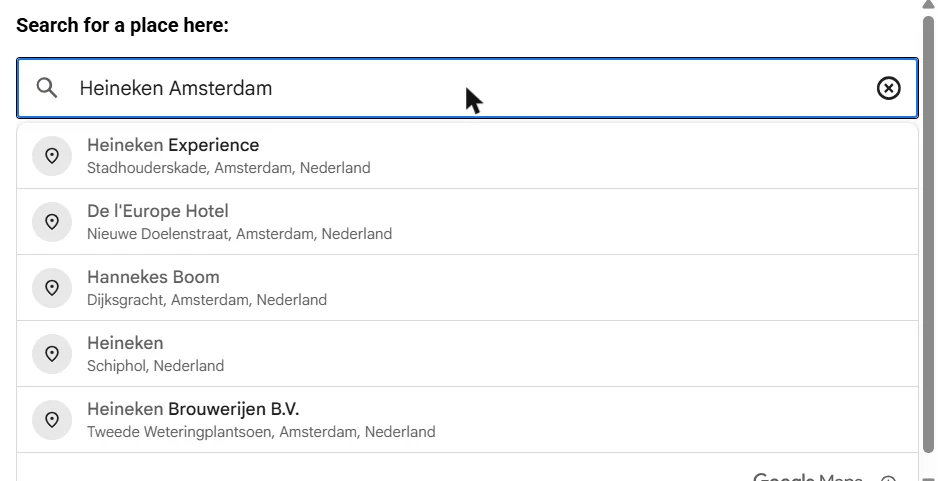
Many forms already have Google's address autocomplete, so it is a fair question. The answer: Google finds places, not companies. We typed "Heineken Amsterdam" into Google's own example. The first suggestions were a museum, a hotel and a bar.
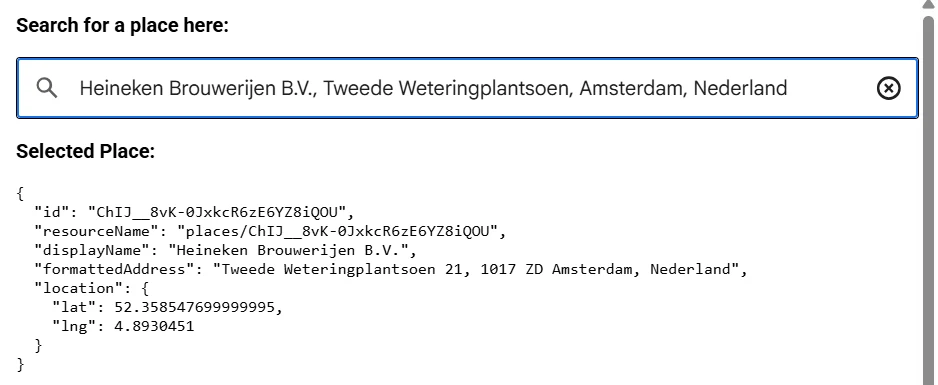
Picking the company gives you a place ID, a name, an address and coordinates. No registration number, no legal form, no size, no industry. Fine for a delivery address. Not enough to know who your customer is.
And Google only knows what is on Google Maps: mostly shops, restaurants, hotels and other places people visit. A holding company, a consultancy run from home or a subsidiary without a front door is often not there at all. The register has every one of them: 377M+ companies, against the 250 million places Google counts, parks and landmarks included.
And Clearbit's free autocomplete?
Clearbit's autocomplete returns a company name and a website domain. It was built to show a logo next to the name, and since September 2025 the logo field is empty. It finds companies that have a website, and it tells you their domain.
It does not tell you which legal entity is behind that website, and it has no registration number or address. Good for a guess, not for an account you will invoice.
Google Places
Clearbit autocomplete
CompanyData.com API
Finds
Places: shops, restaurants, hotels, landmarks
Companies with a website
Registered companies
Coverage
250M+ places on Google Maps, mostly points of interest
Companies with a web presence
377M+ companies from official registers
Returns
Place ID, name, address, coordinates
Name and domain
The register record
Registration number
No
No
Yes
Legal form
No
No
Yes
Employees, revenue, industry
No
No
Yes
Search by number
No
No
Yes
Same company, same ID
Per location
Per domain
Per legal entity
Build it
A search for the list, an export for the pick
The form asks your server, your server asks the API. Five rules keep it fast, cheap and safe.
Search after three characters, and wait about 300 ms after the last keystroke
Pass a country code when the form already asks for the country; leave it out to search everywhere
Show name, city and registration number in the list, so two companies with the same name are easy to tell apart
Keep the API key on your server and rate-limit each visitor there
When the user picks a company, fetch its full record by ID with one export call, on your server. A search for "Heineken" returns ten or more companies; the export is the one the user chose
// GET /api/company-suggest?q=heineken&country=NL
// Your server holds the key; the browser never sees it.
export async function GET(req) {
  const { searchParams } = new URL(req.url);
  const q = (searchParams.get("q") || "").trim();
  if (q.length < 3) return Response.json([]);

  const params = new URLSearchParams({ search: q, pageSize: "8" });
  const country = searchParams.get("country");
  if (country) params.set("countryCode", country);

  const res = await fetch(
    `https://app.companydata.com/api/company/search?${params}`,
    { headers: { "x-api-key": process.env.COMPANYDATA_API_KEY } }
  );
  const { data } = await res.json();
  return Response.json(data?.records ?? []);
}

// GET /api/company-details?id=...
// The user picked one suggestion: fetch its full record (1 export).
export async function getDetails(id) {
  const res = await fetch(
    `https://app.companydata.com/api/company/export?ID=${encodeURIComponent(id)}&pageSize=1`,
    { headers: { "x-api-key": process.env.COMPANYDATA_API_KEY } }
  );
  const { data } = await res.json();
  return data?.records?.[0] ?? null;
}
function CompanyField({ country, onPick }) {
  const [q, setQ] = useState("");
  const [items, setItems] = useState([]);

  // The user picked one: fetch its full record (1 export) from your server.
  const pick = async (c) => {
    const res = await fetch(`/api/company-details?id=${c.ID}`);
    onPick(await res.json());
  };

  useEffect(() => {
    if (q.length < 3) return setItems([]);
    const t = setTimeout(async () => {
      const res = await fetch(`/api/company-suggest?q=${encodeURIComponent(q)}&country=${country}`);
      setItems(await res.json());
    }, 300); // wait until the user pauses
    return () => clearTimeout(t);
  }, [q, country]);

  return (
    <>
      <input value={q} onChange={(e) => setQ(e.target.value)} placeholder="Company name or number" />
      <ul>
        {items.map((c) => (
          <li key={c.ID} onClick={() => pick(c)}>
            {c["Company Name"]} · {c.City} · {c["Company Registration Number"]}
          </li>
        ))}
      </ul>
    </>
  );
}
No time to build?
Three ways to skip the code
Same register data, ready to plug in.
WooCommerce
The CompanyData.com plugin turns the Company field at checkout into a live search and fills in the address. Classic and block checkout.
From about ten new business customers a day. Our guide explains when to automate, what to fill in, how to score a new account, and how to build it with a coding agent.
Anywhere a business customer tells you who they are.
SaaS signup
A new account arrives with its legal name, size and industry, so it lands in the right plan and onboarding track.
B2B checkout
Company name and VAT-ready address filled in at checkout. Fewer typos on invoices, fewer abandoned carts.
Fintech and KYB
The customer picks their company, you get the registration number to start the business checks. Next step: the KYB API.
Supplier and partner portals
New suppliers register against the official record, so procurement starts from one entity, not three spellings.
Lead forms
Ask for less. A short form with a company field gives sales the size and industry they would otherwise have to look up.
Internal tools
Sales and support pick the company from the register when they create an account, instead of typing it.
Onboarding regulated customers? Autocomplete is the first step; the business checks come next. See the KYB API. Filling in accounts that already exist? That is the Company Enrichment API.
Public prices and a 7-day trial on every plan. A signup costs a few searches while the user types, plus one export for the company they pick.
Two ways to start
Sign up yourself. Pick a plan, start a 7-day trial, and the key is issued at once. Right for one signup form or checkout.
Or talk to us. For a platform where your own customers use the field, or for high signup volumes. Custom plans have no rate limit, are priced on volume, and start with a few weeks of testing, up to 1,000 free calls, no credit card.
* Card-free trials are for teams that fit a custom plan: platforms, higher volumes, or many end users on one key. Self-serve plans start a 7-day trial at signup.
Self-serve
Custom plan
Rate limit
50 requests per second
None
Pricing
Public, from $34 a month
On volume, from €500 a month
Cost per signup
A few searches while typing, 1 export for the chosen company
Same, on a volume price
Support
Docs and email
Dedicated contact and SLA
Contract
Monthly or yearly
Annual, on volume
What our customers say
Real feedback from the people using CompanyData.com every day.
Account team are very responsive and data is very helpful. We've been dealing with Bolddata for a few years and have found them to be a very efficient team who are able to quickly provide good data.
Ann Sofie Westlake
Head of Marketing, Quartix
★★★★★
Extremely reliable, high quality service, and very competitive prices. Excellent! The very best firm we've ever worked with.
Helmut Huberti, M.D.
World Arthrosis Org., Heidelberg
★★★★★
Quality data, fast and efficient service.
Jérôme Pinneau
Finquest, Luxembourg
Frequently asked questions
What is a company autocomplete API?
It is an API that suggests companies while someone types a company name into a form. The user picks their company from the list, and the form fills in the official details from the company register: registration number, legal form, address, industry, size. The user only types their own name and email.
Which countries does it cover?
Companies from official registers in 190+ countries, through one endpoint and one JSON format. Pass a country code to search one country, or leave it out to search everywhere.
Can users search by registration number too?
Yes. Most people type the name, because that is what they know. Accounts and finance teams often have the number at hand, so accept both in the same field. A number finds exactly one company.
How is this different from Google Places autocomplete?
Google finds places: shops, offices, museums, hotels. For a company name it returns a place ID, a name, an address and coordinates. It does not return a registration number, legal form, number of employees, revenue or industry. And it only knows businesses that are on Google Maps, mostly shops, restaurants and other places people visit; holdings, home-based firms and subsidiaries are often missing. That is fine for a delivery address. For a business customer you need the legal entity, and that comes from the register.
How is it different from Clearbit's free autocomplete?
Clearbit's autocomplete returns a company name and a domain, built for showing logos next to a name. Since September 2025 the logo field is empty. It does not return a registration number, a legal form or an address. Use it to guess a website; use a register lookup to know which company signed up.
How many API calls does one signup cost?
A few searches while the user types, and one export when they pick their company. The searches fill the list: a search for "Heineken" returns ten or more companies. The export fetches the full record of the one the user chose, and that is what fills the form. Wait until the user has typed three characters and stops for about a third of a second before each search, and cache results for the same text, so typing back and forth does not cost extra.
Is it fast enough to use while typing?
Yes. The median response is under 200 milliseconds, which is quicker than most people type the next letter. With a short wait after the last keystroke, the list appears as soon as the user pauses.
Can I call the API straight from the browser?
No. Your API key would be visible to anyone who opens the page. Let the form call your own server, add a rate limit per visitor there, and let your server call the API. Fetch the full record of the picked company on the server too, by its ID, so what you store comes from the register and not from the browser.
Do I need to write code?
For your own signup form, a little: one search call and a dropdown. A coding agent can write it from the prompt in our onboarding guide. WooCommerce shops can install the CompanyData.com plugin instead, and HubSpot users can enrich accounts with the HubSpot app after signup.
Is company autocomplete GDPR-safe?
The API works with company register data, which is public record. You do not send the API anything about the person filling in the form; their name and email stay in your own system under your own privacy policy.
Test autocomplete on your own form, no credit card
Tell us where the company field goes and how many signups you get. You get a trial key for a few weeks with up to 1,000 free calls.
* Card-free trials are for teams that fit a custom plan: platforms, higher volumes, or many end users on one key. Self-serve plans start a 7-day trial at signup.